Fallout 4 Supply Lines Guide: How to Link Settlements
My friend is playing Fallout 4 for the first time. As he’s asking questions, I decided to do another playthrough while in Discord. He asked me if there was a way to link settlements. Of course, I had to oblige. But I also noticed there are many new Fallout 4 players, joining the fandom after watching the Fallout series on Amazon Prime. There are also many players revisiting the game because the replayability is just preem.
I wrote up this PC-focused guide to explain what supply lines in Fallout 4 do, how to unlock them, how to set them up step by step, and how to design a network that scales as you reclaim more of the Commonwealth.
What Are Supply Lines in Fallout 4?
Supply lines are such an important piece to Fallout 4’s settlement system. Once unlocked, they allow your settlements to share resources automatically, making crafting, building, and expansion dramatically easier, especially on PC, where settlement gameplay really shines.
Instead of fast traveling just to dump junk or abandoning builds halfway through, take advantage of supply lines—and early on.
Supply lines connect two or more settlements so they can share resources. Once connected, settlements automatically share:
All workshop junk and crafting materials
Surplus food and water
Access to stored junk when building
Indirect support for stores and caps generation
Supply lines let you use crafting materials from any connected settlement without manually transporting them.
What You Need to Create Supply Lines
Before the option appears, you need to meet the following requirements:
1. Have At Least Two Settlements
Each settlement must be unlocked and allied. You must be able to access both workshops.
2. One Unassigned Settler
Any generic settler can become a provisioner. You cannot assign:
Companions
Most unique NPCs
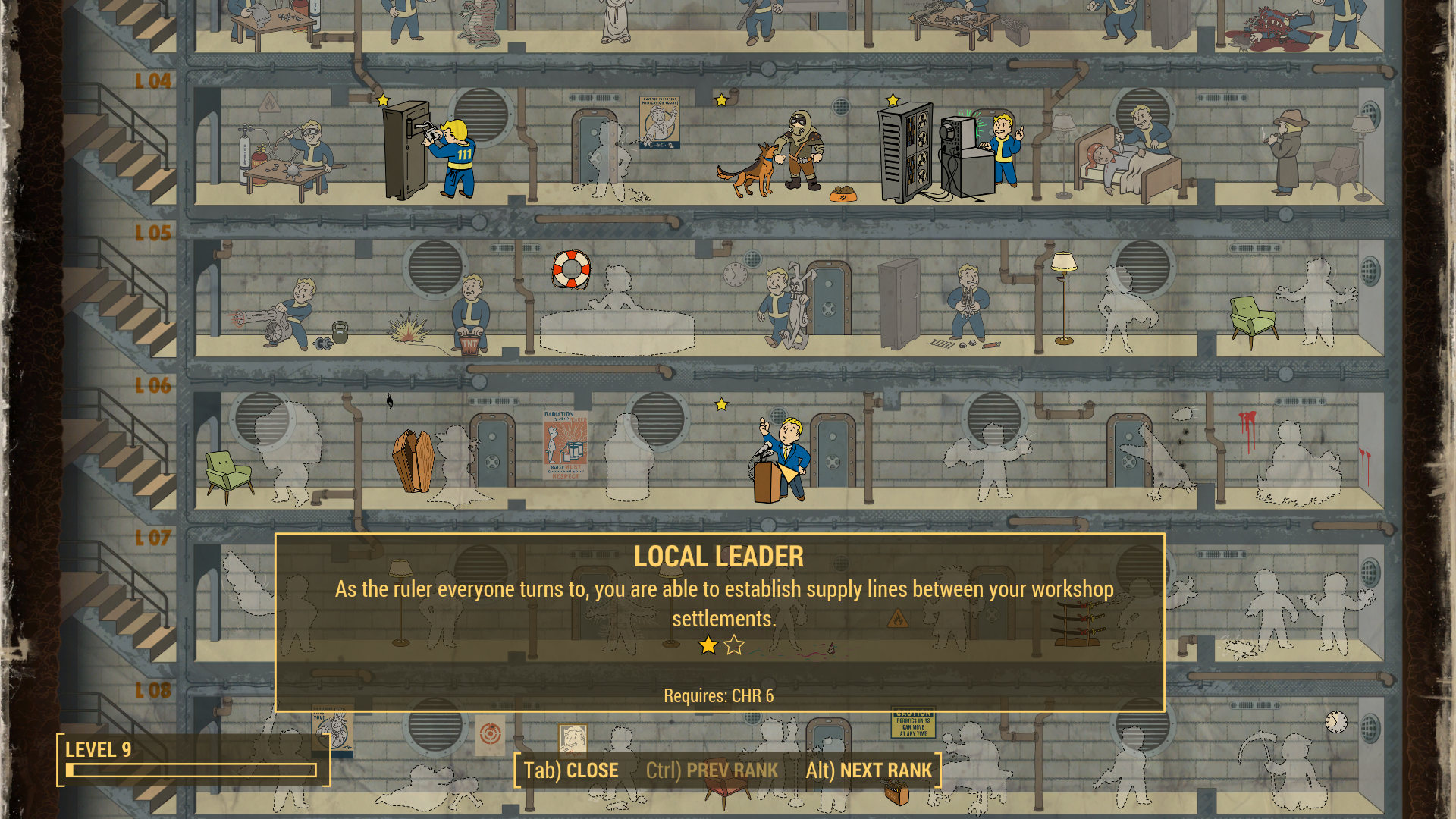
3. Local Leader Perk (Rank 1)
Requires Charisma 6
Unlocks the supply line command
Without this perk, supply lines are impossible.
4. No Existing Connection
You cannot create duplicate supply lines between the same settlements.
How to Set Up a Supply Line in Fallout 4
Step 1: Enter Workshop Mode
Stand inside the settlement’s build area and activate the workshop.
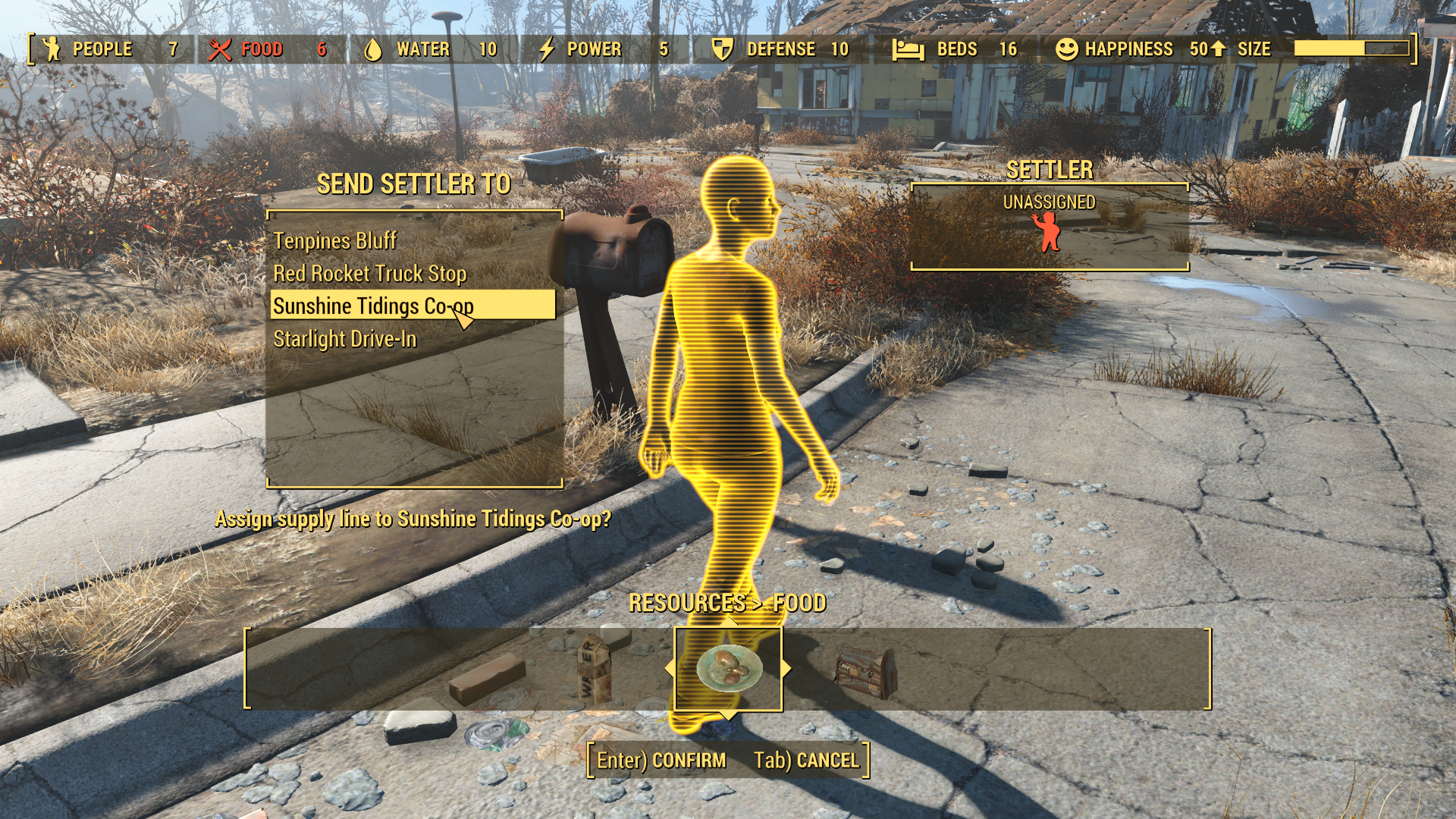
Step 2: Highlight a Settler
Move your cursor over a settler until the command options appear.
Step 3: Assign the Supply Line
Press the supply line key:
PC: Q
Xbox: RB
PlayStation: R1
This opens a list of all settlements you control.
Step 4: Choose the Destination Settlement
Select the settlement you want to link.
The settler becomes a provisioner and will travel between locations with a Brahmin.
Step 5: Repeat as Needed
You can create as many supply lines as you want, limited only by available settlers.
How to View Supply Lines on the Map
Fallout 4 includes a dedicated supply line map overlay.
Open your Pip-Boy Map
Toggle supply lines:
PC: C
Xbox: LB
PlayStation: L1
White lines will appear, showing every active connection between settlements.
On PC, press C on the Pip-Boy map to view all active supply lines.

Best Supply Line Network Layouts
There’s no single best layout, but these three approaches work consistently.
Hub Network
One central settlement connects to every other settlement. Personally, I like making Sanctuary the main hub because of the sheer amount of land and space.
Common hubs: Sanctuary, Red Rocket, The Castle
Pros
Easy to manage
Centralized crafting access
Ideal for beginners
Cons
Heavy reliance on the hub
Chain (Route) Network
Settlements connect in a sequence across the map.
Example:
Sanctuary → Abernathy Farm → Sunshine Tidings → Graygarden
Pros
Efficient for long distances
Uses fewer provisioners
Cons
One broken link disrupts the chain
Hybrid Network
Multiple hubs connected by short chains.
This setup works best for large PC playthroughs with 20+ settlements, balancing efficiency and flexibility.
Provisioner Tips for PC Players
Provisioners do not need beds or food at their home settlement
They can fight—better weapons and improve survival
You can reassign them at any time
Brahmin spawn automatically
Provisioners are considered “in transit,” so they won’t affect happiness calculations the way idle settlers do.
Quick Settlement Tip: Removing Dead Bodies
While setting up a settlement or assigning supply lines, don’t forget to clean up any corpses left behind after clearing the area.
Dead bodies can block building placement and clutter your settlement, but you can move them manually.
To move bodies in Fallout 4:
PC: Hold E while aiming at the corpse
Xbox: Hold A
PlayStation: Hold X
Drag the body outside the build area or into water to keep your settlement clean and build-friendly.

Why You Need Supply Lines in Fallout 4
Unlimited Crafting Freedom
All connected settlements share materials and junk, letting you build anywhere.
Settlement Specialization
Designate settlements as:
Food farms
Water purification hubs
Trading posts
Faster Expansion
Defenses, stores, and crafting stations become much easier to build consistently.
Less Micromanagement
Once set up, supply lines run quietly in the background. Automate your settlements so you can focus on surviving the Commonwealth.
Common Supply Line Mistakes
Delaying the Local Leader perk
Assigning too many provisioners
Creating long, inefficient routes
Forgetting to connect new settlements
New settlements do not auto-connect. You must link them manually.
Fallout 4 Supply Lines FAQ
Q: What does a supply line do in Fallout 4?
A: A supply line allows settlements to share junk, crafting materials, food, and water without manually transporting items.
Q: How do I unlock supply lines in Fallout 4?
A: You must take Rank 1 of the Local Leader perk, have at least two settlements, and assign an unassigned settler as a provisioner.
Q: What key shows supply lines on PC?
A: Open the Pip-Boy map and press C to toggle supply line visibility.
Q: Do supply lines share weapons and armor?
A: No. Supply lines only share junk and crafting materials, not stored weapons or armor.
Q: Do provisioners need food or beds?
A: No. Provisioners are considered in transit and do not require beds or food.
Q: Can supply lines be reassigned?
A: Yes. You can reassign provisioners at any time by selecting them in workshop mode.
Supply lines automate your Fallout 4 settlements by creating a tidy, interconnected network. It makes building up settlements more enjoyable by lessening the need to fast travel for needed mats. If you’re looking for power armor in Fallout 4, check out our guide to power armor.